Watch your front door. Talk to anyone. From anywhere.
Kemo Pro App is the official companion for smart video doorbells and battery cameras. Instant motion alerts, HD live view, and two-way audio — on iPhone, Android, Mac and visionOS.

Trusted by hundreds of thousands of homeowners
One app. Every Kemo Pro–compatible device.
Pair smart doorbells, battery cameras and indoor cams in minutes. Manage them all from a single dashboard — no extra software, no separate accounts.

Smart video doorbells
1080p HD video, wide-angle lens, two-way audio and PIR motion detection. See and speak to anyone at your door.
Battery cameras
Wire-free outdoor protection with weatherproof builds. Months of battery life on a single charge.
Indoor cameras
Keep an eye on kids, pets and parcels while you are away. Privacy shutter lets you switch the camera off when home.
Wireless chimes
Hear visitors anywhere in the house — no phone required. Pair multiple chimes for larger homes.
See, hear and speak — from anywhere
Every Kemo Pro feature is built around one question: "Is everything OK at home right now?"
HD live view
Crisp 1080p video over Wi-Fi or mobile data. Tap a notification and live video launches in under three seconds.
Two-way audio
Talk to delivery drivers, family or unexpected visitors without opening the door — your voice, their speaker, instantly.
PIR motion alerts
Smart human-shape filtering separates real visitors from cars, shadows and leaves — fewer false alarms, more peace of mind.
Cloud event recording
Up to 30 days of motion-triggered clips, replayable from any device. Local SD storage works free, forever.
Color & IR night vision
See clearly after dark with color night vision in low light and infrared fallback in total darkness.
Multi-device dashboard
Switch between every camera in your home with one tap. Health checks show battery, signal and storage at a glance.
Designed for the moment something happens
Three taps from lock screen to live video. Here is what every screen actually looks like — these are real captures from the iPhone build, not mockups.
All your devices, one screen
Battery level, Wi-Fi signal strength and event count at a glance. Tap any device to enter live view.
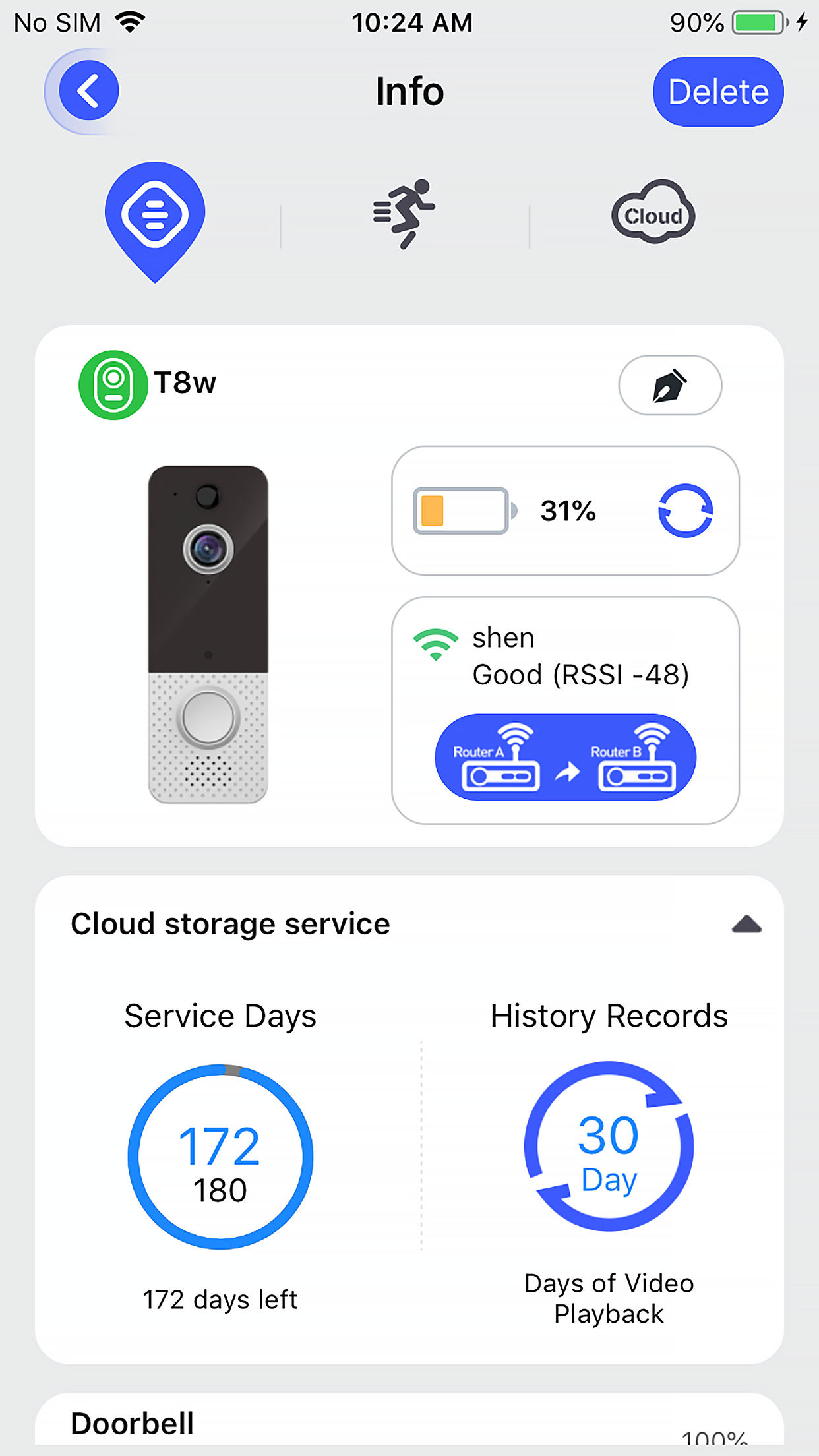
A health check for every camera
Battery, signal strength, motion settings and cloud-storage status — without leaving the home view.
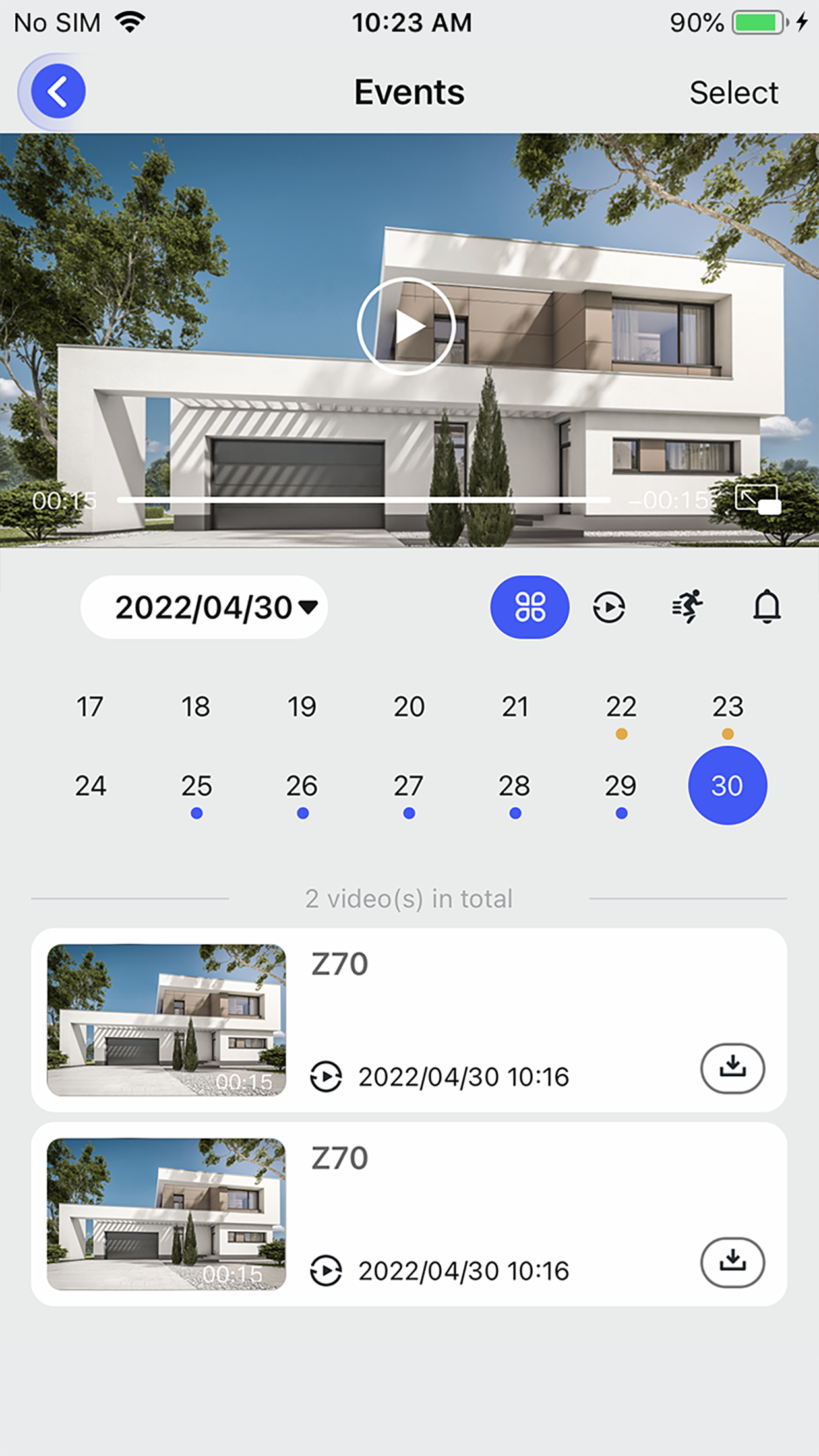
Replay any event with one swipe
Calendar timeline of every motion clip and doorbell press, organized by day and downloadable in one tap.
From box to live view in under five minutes
Kemo Pro walks you through pairing step by step. The app does the work — you just hold your phone steady.
Download Kemo Pro
Search "Kemo Pro" on the App Store or Google Play. Sign up with email and verify your account.
Pair on 2.4 GHz Wi-Fi
Hold your phone up to the camera so it can read the on-screen QR code. 5 GHz networks are not supported — switch bands first.
Watch from anywhere
Mount the device, enable motion alerts, and you are protected — at home or on the road.
Optional cloud. Honest pricing.
Live view, two-way audio and local SD recording work for free, forever. Cloud event history is an optional add-on — no bait and switch, cancel any time.
Free
Everything you need to start
- Live HD view, unlimited
- Two-way audio
- Motion & doorbell alerts
- Local SD storage on supported devices
Cloud Monthly
Flexibility, no contract
- 30-day rolling event history
- Unlimited cloud clips
- Watch on any device
- Cancel any time
Cloud Annual
Save 37%Best value for full-year coverage
- Everything in Monthly
- Priority email support
- Early access to new features
Subscriptions are billed through your Apple ID or Google Play account at the prices shown in the App Store / Play Store. Manage or cancel any time from your store account.
Compare all plansAnswers to the questions we hear the most
Step-by-step setup walkthroughs and troubleshooting written by the support team — not auto-generated, all kept up to date.
App download & account setup
Install Kemo Pro on iPhone or Android and create your first account.
Connecting phone to device
QR-code pairing, the 2.4 GHz Wi-Fi requirement, and what to do when pairing fails.
Troubleshooting
Offline cameras, missed notifications and the most common fixes — ordered by how often we see them.
Settings & preferences
Customize motion zones, notification types, recording schedules and account preferences.
Battery & charging
How long battery cameras last, charging tips, and the power-saving modes that extend runtime.
Recording videos
Local SD versus cloud storage, retention windows and how to download or share a clip.
Cloud storage subscription
What is included at each tier, billing details and how to cancel or downgrade.
Chime & doorbell ring
Pair a wireless chime so you never miss a visitor — even when your phone is on silent.
Waterproofing & installation
IP ratings, mounting tips and how to protect outdoor cameras from rain, dust and direct sun.
Real reviews from real users
Highlights from the 588K App Store and 1M+ Play Store ratings. We do not pay for testimonials.
“Setup took less than four minutes. The QR-code pairing is the smoothest I have used across three doorbell brands.”
“Night vision is honestly better than my old wired system. And I can see who is at the door before I even get up.”
“The cloud plan is cheap enough that I just renewed for a year. Worth it for the peace of mind.”
“I run a doorbell and two battery cameras on one app. Switching between them is instant.”
“Live view loads in two or three seconds. That matters when you hear something outside.”
“Battery lasts about six weeks on my doorbell — better than the spec sheet suggested.”
588K reviews on App Store · 1M+ downloads on Google Play
Frequently asked questions
Short answers to the questions every new user has. Need more? The full help center has 50+ in-depth guides.
Is Kemo Pro the same app as Aiwit?+
Yes. On iOS the app is listed as "Kemo Pro"; on Android the same app is published under the name "Aiwit" (package id com.eken.aiwit). Both are made by NumLake Tech Limited and use the same account — sign in once, see everything everywhere.
Does Kemo Pro work on 5 GHz Wi-Fi?+
Most Kemo Pro doorbells and cameras connect over 2.4 GHz Wi-Fi only. Before pairing, switch your phone to the 2.4 GHz band of your router. Once paired, the app itself works on any network.
What works without a cloud subscription?+
Live HD view, two-way audio, motion and doorbell alerts, and local SD recording on supported devices all work for free — forever. Cloud is an optional add-on for event history.
How much does the cloud plan cost?+
Around $3.99 per month, or $29.99 per year (a saving of about 37%). Billing is handled by your App Store or Google Play account; cancel any time from there.
Which devices is the app compatible with?+
Smart video doorbells, battery cameras, indoor cameras and wireless chimes from the Kemo Pro / EKEN / Aiwit ecosystem. The app itself runs on iOS 13+, Android, Mac (Apple silicon) and visionOS.
How do I get support?+
Email [email protected] or visit the help center on this site. Most replies arrive within two business days.
Get the Kemo Pro App
Free to download. Free to use. Set up your first device in under five minutes — no credit card required.

Scan with your phone camera to install
No credit card required